GPS Voice Map & Route Finder
Softo AppsMaps & Navigation
4.4177.00 Reviews
- Version
- 1.80.3
- Installs
- 500.00K
- Age Rating
- Everyone
Screenshots
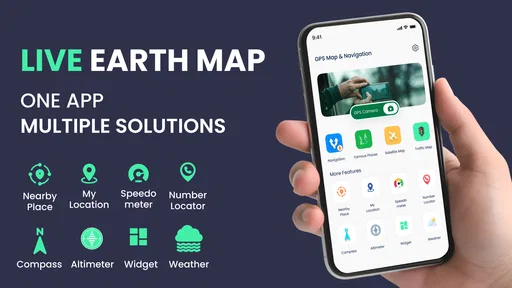
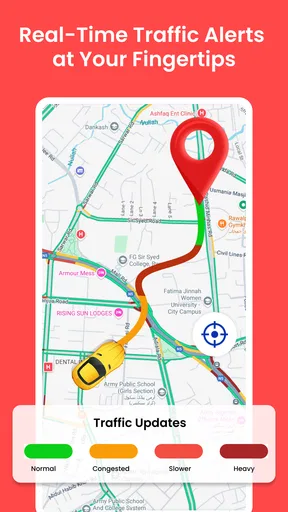
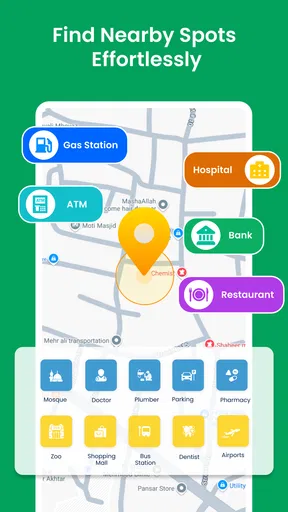

Our Review of GPS Voice Map & Route Finder
 Analysis by Appyee
I came away from GPS Voice Map & Route Finder with the impression that it is best understood as a straightforward travel companion rather than a complete replacement for every navigation tool on a phone. Its focus is clear: helping me find directions, compare routes, and follow a journey with spoken guidance. That simplicity is useful when I want to get moving without spending much time learning a complicated interface.
The app sits in the Maps & Navigation category and is made by Softo Apps. It is free to install, with optional in-app purchases ranging from $3.99 to $99.99 per item. That makes the initial decision easy: I can try the basic experience before deciding whether the extra paid options are worthwhile. It is also rated for Everyone, so the presentation is aimed at a broad audience rather than a specialist group of drivers or outdoor users.
How GPS Voice Map & Route Finder feels in everyday use
The main appeal is the combination of a visual map and voice-led directions. When I am driving, I do not want to keep looking down at the screen to understand the next turn. Spoken instructions let me keep my attention on the road while the map remains available for checking the wider route. That balance is more useful than a map that only displays a line and leaves me to interpret every junction myself.
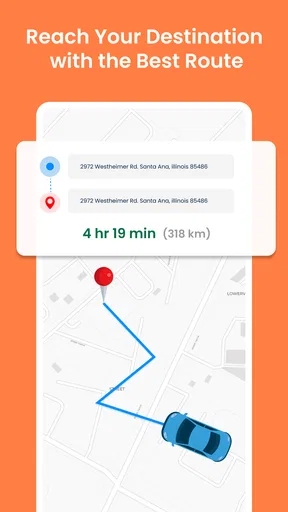
I found the app most convincing for ordinary trips: getting across town, reaching an unfamiliar neighborhood, or finding a sensible route between two known places. The store summary emphasizes map directions and shorter routes intended to avoid delays, and that gives the app a practical purpose beyond simply showing my current position. It is designed around the question I usually have before leaving: which way should I go?
The experience is also approachable for people who do not want a large collection of travel features. Some navigation products combine maps with restaurant listings, public transport information, saved places, reviews, account features, and many other tools. Those additions can be helpful, but they can also make a quick route request feel unnecessarily busy. This app’s clearer identity may suit someone who mainly needs directions and voice guidance.
Its current version is 1.75, and the application supports devices running Android 7.0 or later. That is worth checking before installation, particularly if I am using an older phone that still works well for everyday tasks. On a compatible device, the app is positioned as a lightweight option for basic navigation rather than a high-end travel planning system.
Where the route-focused design helps most
One useful habit is to check the proposed route before starting, rather than accepting the first line automatically. I like to look at the overall shape of the journey and notice whether it sends me through a complicated central area, a series of small turns, or an unfamiliar road that I would rather avoid. A shorter route is not always the easiest route, especially when I am driving at night, carrying passengers, or trying to arrive without last-minute lane changes.
This is where a route finder can be more valuable than a simple point-to-point map. I can think about the journey as a whole before the voice instructions begin. If the app offers more than one sensible path on my device, comparing them gives me a chance to choose between distance and comfort. Even when I ultimately follow the suggested route, that quick inspection reduces surprises.
A realistic example would be a weekday trip to a medical appointment in a part of town I rarely visit. I would enter the destination before leaving, examine whether the route approaches the building from a confusing side street, and start the voice guidance only after I have parked or prepared the phone securely. During the trip, the spoken prompts would be more useful than repeatedly checking the screen, while the map would help me understand whether I was still on the broad route toward the destination.
Another good use is a last-minute change of plan. If a friend sends me a new meeting place or I need to collect something from an unfamiliar address, I can use the app as a focused navigation tool instead of opening a larger ecosystem of services. The benefit is not that it makes every journey effortless; it is that the core task remains easy to identify.
Practical habits that make the app easier to trust
I would recommend entering the full destination carefully instead of relying on a vague name. Similar place names, branches, and streets can lead to very different results. Checking the displayed destination on the map before moving is a small step, but it prevents the common mistake of following perfectly clear instructions to the wrong location.
I would also prepare the route while stationary. This sounds obvious, yet it changes the experience considerably. Searching, zooming, and comparing the route are tasks for a parked car or a safe place before departure. Once I am moving, the app is most useful when I treat it as a voice assistant and glance at the map only when it is safe.
A further trade-off is the difference between a route that looks short and one that feels manageable. A road with many turns may be efficient on the map but tiring in practice. If I am unfamiliar with the area, I prefer a route that is easier to follow, even if it is not the absolute shortest option. The app can help me find a path, but I still need to apply common sense to the choice.
Voice guidance is particularly helpful when the phone is mounted at an awkward angle or when sunlight makes the display difficult to read. It is also useful for passengers who are helping with navigation but do not want to hold the phone throughout the journey. I would still keep the volume at a level that allows me to hear traffic and emergency sounds; navigation should support safe driving, not compete with it.
What it does better than a typical map view
A static map answers “where am I?” more effectively than “what should I do next?” The route-and-voice approach in this app is more action-oriented. Instead of studying the map continuously, I can use the visual display for orientation and rely on prompts for immediate decisions. That division of labor is the strongest reason to choose it over a basic map viewer.
It can also be less intimidating for a first-time user. A person who only wants to reach a destination may not need layers of geographical information or a long list of nearby businesses. The app’s purpose is easier to explain to a family member: enter the place, review the route, and follow the guidance. That clarity matters when someone is not comfortable with navigation technology.
At the same time, I would not confuse a focused interface with a universally superior one. Larger navigation platforms often have deeper location databases, more extensive traffic context, and stronger integration with other travel needs. If I am planning a multi-stop day, checking opening information, coordinating public transport, or exploring an area on foot, a broader mapping service may be more convenient.
The limitations I would consider before relying on it
The biggest limitation is that route guidance is only as useful as the map information and the situation around me. A suggested path can be reasonable while still being unsuitable for a particular vehicle, a nervous driver, bad weather, roadworks, or a difficult parking area. I would not treat the app’s shortest-looking route as an instruction to ignore road signs or local restrictions.
I also see a practical limitation in the app’s focused scope. Someone expecting a full travel assistant may find it lacking compared with established alternatives that combine navigation with extensive place discovery and transport planning. This does not make the app poor; it simply means the value depends on whether I want a route tool or an entire travel platform.
The free entry point is welcome, but the presence of optional purchases means I would pay attention to which functions are included before spending money. The purchase range is wide, so I would not assume that every useful extra is part of the no-cost experience. For me, the sensible approach is to test the basic workflow first and only consider an upgrade if it solves a specific problem I actually have.
Another point is device compatibility. Because the app requires Android 7.0 or later, owners of older phones should check that requirement before planning to use it. A navigation app is not something I want to discover is incompatible immediately before a trip. On a supported phone, I would still test the voice prompts and route display at home so I know how they behave before depending on them on unfamiliar roads.
I would be cautious about using any navigation application as my only preparation for a remote journey. For long drives, I prefer to know the broad direction, recognize major towns or road changes, and have a backup plan. Voice guidance is convenient, but it should not replace awareness of the road or sensible preparation. This is especially important when a route changes unexpectedly or the phone becomes difficult to use.
Who will get the most from it
I think the strongest audience is the everyday driver who wants uncomplicated directions and spoken assistance. New drivers may appreciate having the route visible while hearing the next action, and occasional travelers can use it without committing to a complicated planning system. It is also a reasonable option for someone with a compatible Android phone who wants to try a free navigation app before considering paid extras.
It may suit families as well. A passenger can help enter the destination and review the route, after which the driver can concentrate on the journey. The Everyone rating supports that broad, accessible positioning, although safe use still depends on the adult handling the phone responsibly and avoiding interaction while driving.
I would be less likely to recommend it as the main choice for professional drivers, frequent international travelers, or people who need a rich set of travel layers. Those users may prefer a more established alternative with stronger specialist tools, broader planning features, or a workflow built around repeated daily trips. Likewise, walkers and cyclists should make sure the route behavior matches their needs rather than assuming a driving-oriented experience will suit every mode of travel.
The app’s reception suggests that it has found an audience: it has a 4.1 average from around a thousand ratings and has passed 500 thousand installs. I read those figures as signs of practical interest rather than proof that it will be perfect for every phone or journey. The more useful question is whether its simple route-and-voice approach matches the way I travel.
My final view after weighing the trade-offs
GPS Voice Map & Route Finder works best when I keep my expectations focused. It gives me a direct way to look for directions and follow a route with voice support, without requiring me to turn the app into a complete travel planner. That is its clearest strength, and it is enough to make the free download worth considering for routine journeys.
I would install it for local driving, occasional trips, and situations where I want a clean route-finding experience. I would review the route before leaving, choose practicality over a blindly short path, and test the guidance on my phone before using it somewhere important. Those habits make a bigger difference than simply pressing start and assuming the first suggestion is ideal.
My recommendation is therefore specific: choose it if you want a simple navigation companion and are comfortable checking the route yourself. Skip it in favor of a broader mapping alternative if you need detailed travel planning, extensive place information, or specialist navigation tools. For the right user, GPS Voice Map & Route Finder is a useful, approachable option; its real strength is not trying to be everything, but making the basic journey from destination to directions easy to understand.
Privacy and Permissions
See what permissions an app requests and how it handles your data.
- Location
- approximate location (network-based), precise location (GPS and network-based)
- Camera
- take pictures and videos
- Wi-Fi connection information
- view Wi-Fi connections
- Other
- view network connections, full network access, control vibration, prevent device from sleeping, Google Play license check
Verdict
Strengths of GPS Voice Map & Route Finder
- Clear turn-by-turn voice guidance helps reduce screen checking while driving.
- Useful route planning tools can make unfamiliar journeys easier to organize.
- Map access may remain helpful when mobile coverage is weak or unavailable.
- Location search supports finding nearby places, addresses, and useful destinations.
- Simple navigation features are suitable for everyday commuting and road trips.
Limitations of GPS Voice Map & Route Finder
- GPS tracking can noticeably reduce battery life during longer journeys.
- Voice directions may be distracting or inaccurate in noisy driving conditions.
- Some map, traffic, or navigation features may require an internet connection.
- Route results can vary depending on map data and the selected travel mode.
- Advertising or premium restrictions may limit access to certain navigation tools.
Similar Picks in This Category
View All
Uber - Request a ride
Uber Technologies, Inc.4.7


inDrive. Rides with fair fares
® SUOL INNOVATIONS LTD4.8

Yandex Go: Taxi Food Delivery
Mikromobilnost LLC Belgrade4.8

Bolt: Request a Ride
Bolt Technology4.8

Rapido: Bike-Taxi, Auto & Cabs
Rapido Bike Taxi4.8
Frequently Asked Questions
What is GPS Voice Map & Route Finder used for?
GPS Voice Map & Route Finder is designed to help you plan routes and navigate to destinations using GPS-based directions. It can be useful for driving, walking, or exploring unfamiliar areas, depending on the features available in your version. The app typically combines map information, route planning, location tracking, and spoken instructions so you can follow directions without constantly looking at your phone.
Does GPS Voice Map & Route Finder work without an internet connection?
The app may require an internet connection to load maps, search for destinations, calculate routes, receive traffic information, or update location data. Some versions or map services may support offline maps, but this should not be assumed before downloading. If you plan to travel through areas with weak coverage, check the app’s offline-navigation options and download any required map data in advance.
How accurate are the voice directions and GPS location tracking?
Navigation accuracy depends on your phone’s GPS hardware, signal strength, map data, road conditions, and the permissions granted to the application. Voice instructions can be helpful while driving because they reduce the need to view the screen, but they should be treated as guidance rather than an absolute authority. Always follow road signs, local traffic laws, and changing conditions.
Does GPS Voice Map & Route Finder require location permissions?
Yes, navigation applications generally need access to your device’s location to identify your position, follow your movement, and provide turn-by-turn guidance. The app may also request permission to operate in the background so directions continue when the screen is locked or another application is open. Review the permission prompts carefully and choose the least access necessary for the features you intend to use.
Is GPS Voice Map & Route Finder free to download and use?
The application may be available as a free download, but some functions can depend on advertising, optional purchases, subscriptions, or limitations in the free version. Features such as advanced route planning, offline maps, traffic information, additional voices, or an ad-free experience may not be included automatically. Check the store listing and in-app purchase details before relying on it for regular travel.
